> ## Documentation Index
> Fetch the complete documentation index at: https://firecrawl.web3doc.top/llms.txt
> Use this file to discover all available pages before exploring further.
# 快速入门
> Firecrawl 允许您将整个网站转换为 LLM 就绪的 Markdown
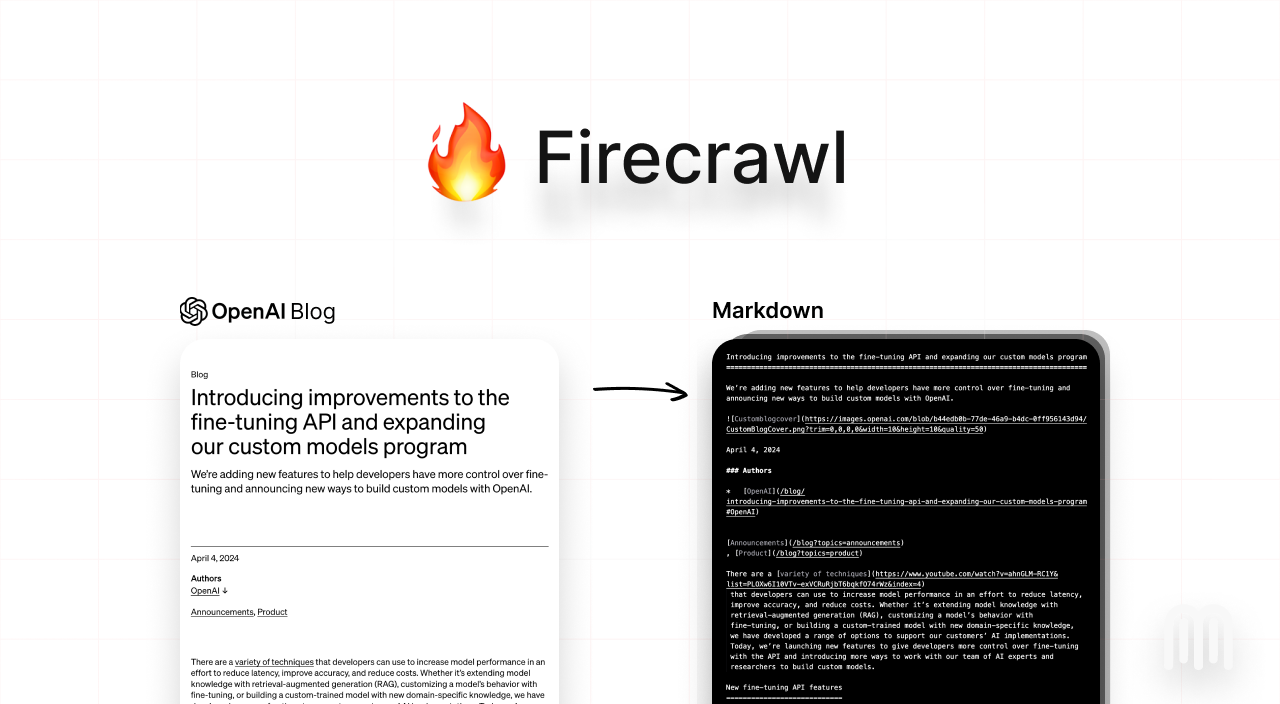 ## 欢迎来到 Firecrawl
[Firecrawl](https://firecrawl.dev?ref=github) 是一个 API 服务,它接受一个 URL,进行爬取,并将其转换为干净的 Markdown。我们会爬取所有可访问的子页面,并为您提供每个页面的干净 Markdown。不需要站点地图。
## 如何使用?
我们提供了易于使用的 API,通过托管版本提供。您可以在 [这里](https://firecrawl.dev/playground) 找到游乐场和文档。如果您愿意,也可以自行托管后端。
请查看以下资源以开始使用:
* **API**: [文档](https://docs.firecrawl.dev/api-reference/introduction)
* **SDKs**: [Python](https://docs.firecrawl.dev/sdks/python), [Node](https://docs.firecrawl.dev/sdks/node), [Go](https://docs.firecrawl.dev/sdks/go), [Rust](https://docs.firecrawl.dev/sdks/rust)
* **LLM 框架**: [Langchain (python)](https://python.langchain.com/docs/integrations/document_loaders/firecrawl/), [Langchain (js)](https://js.langchain.com/docs/integrations/document_loaders/web_loaders/firecrawl), [Llama Index](https://docs.llamaindex.ai/en/latest/examples/data_connectors/WebPageDemo/#using-firecrawl-reader), [Crew.ai](https://docs.crewai.com/), [Composio](https://composio.dev/tools/firecrawl/all), [PraisonAI](https://docs.praison.ai/firecrawl/), [Superinterface](https://superinterface.ai/docs/assistants/functions/firecrawl), [Vectorize](https://docs.vectorize.io/integrations/source-connectors/firecrawl)
* **低代码框架**: [Dify](https://dify.ai/blog/dify-ai-blog-integrated-with-firecrawl), [Langflow](https://docs.langflow.org/), [Flowise AI](https://docs.flowiseai.com/integrations/langchain/document-loaders/firecrawl), [Cargo](https://docs.getcargo.io/integration/firecrawl), [Pipedream](https://pipedream.com/apps/firecrawl/)
* **其他**: [Zapier](https://zapier.com/apps/firecrawl/integrations), [Pabbly Connect](https://www.pabbly.com/connect/integrations/firecrawl/)
* 需要 SDK 或集成吗?通过打开一个 issue 告诉我们。
**自托管**: 要进行自托管,请参考指南 [这里](/contributing/self-host)。
### API 密钥
要使用 API,您需要在 [Firecrawl](https://firecrawl.dev) 上注册并获取一个 API 密钥。
## 爬取
用于爬取一个 URL 及其所有可访问的子页面。这会提交一个爬取任务并返回一个任务 ID,用于检查爬取状态。
### 安装
```bash Python theme={null}
pip install firecrawl-py
```
```bash JavaScript theme={null}
npm install @mendable/firecrawl-js
```
```bash Go theme={null}
go get github.com/mendableai/firecrawl-go
```
```toml Rust theme={null}
# add the following to your Cargo.toml
[dependencies]
firecrawl = "^0.1"
tokio = { version = "^1", features = ["full"] }
serde = { version = "^1.0", features = ["derive"] }
serde_json = "^1.0"
uuid = { version = "^1.10", features = ["v4"] }
[build-dependencies]
tokio = { version = "1", features = ["full"] }
```
### 使用
```python Python theme={null}
from firecrawl import FirecrawlApp
app = FirecrawlApp(api_key="YOUR_API_KEY")
crawl_result = app.crawl_url('docs.firecrawl.dev', {'crawlerOptions': {'excludes': ['blog/*']}})
# Get the markdown
for result in crawl_result:
print(result['markdown'])
```
```js JavaScript theme={null}
import FirecrawlApp from '@mendable/firecrawl-js';
// Initialize the FirecrawlApp with your API key
const app = new FirecrawlApp({ apiKey: 'YOUR_API_KEY' });
// Crawl a website
const crawlResult = await app.crawlUrl('docs.firecrawl.dev', {
crawlerOptions: { excludes: ['blog/*'] },
});
// Log the markdown
console.log(crawlResult.map(result => result.markdown));
```
```go Go theme={null}
import (
"fmt"
"log"
"github.com/mendableai/firecrawl-go"
)
func main() {
// Initialize the FirecrawlApp with your API key
app, err := firecrawl.NewFirecrawlApp("YOUR_API_KEY")
if err != nil {
log.Fatalf("Failed to initialize FirecrawlApp: %v", err)
}
// Crawl a website
params := map[string]any{
"crawlerOptions": map[string]any{
"excludes": []string{"blog/*"},
},
}
crawlResult, err := app.CrawlURL("docs.firecrawl.dev", params)
if err != nil {
log.Fatalf("Error occurred while crawling: %v", err)
}
// Get the markdown
for _, result := range crawlResult {
fmt.Println(result.Markdown)
}
}
```
```rust Rust theme={null}
use firecrawl::FirecrawlApp;
#[tokio::main]
async fn main() {
// Initialize the FirecrawlApp with the API key
let api_key = "YOUR_API_KEY";
let api_url = "https://api.firecrawl.dev";
let app = FirecrawlApp::new(api_key, api_url).expect("Failed to initialize FirecrawlApp");
// Crawl the URL
let crawl_params = json!({
"crawlerOptions": {
"excludes": ["blog/*"]
}
});
let crawl_result = app
.crawl_url("https://example.com", Some(crawl_params), true, 2, None)
.await;
// Print the crawl result
match crawl_result {
Ok(data) => println!("Crawl Result:
{}", data),
Err(e) => eprintln!("Crawl failed: {}", e),
}
}
```
```bash cURL theme={null}
curl -X POST https://api.firecrawl.dev/v0/crawl \
-H 'Content-Type: application/json' \
-H 'Authorization: Bearer YOUR_API_KEY' \
-d '{
"url": "https://docs.firecrawl.dev"
}'
```
如果你不使用 SDK 或更喜欢使用 Webhook 或其他轮询方法,可以将 `wait_until_done` 设置为 `false`。
这会返回一个 jobId。
对于 cURL,/crawl 始终会返回一个 jobId,你可以用它来检查抓取的状态。
```json theme={null}
{ "jobId": "1234-5678-9101" }
```
### 检查抓取作业
用于检查抓取作业的状态并获取其结果。
```python Python theme={null}
status = app.check_crawl_status(job_id)
```
```js JavaScript theme={null}
const status = await app.checkCrawlStatus(jobId);
```
```go Go theme={null}
status, err := app.CheckCrawlStatus(jobId)
if err != nil {
log.Fatalf("Failed to check crawl status: %v", err)
}
```
```rust Rust theme={null}
let status = match app.check_crawl_status(jobId).await {
Ok(status) => status,
Err(e) => panic!("Failed to check crawl status: {:?}", e),
};
println!("Crawl Status: {:?}", status);
```
```bash cURL theme={null}
curl -X GET https://api.firecrawl.dev/v0/crawl/status/1234-5678-9101 \
-H 'Content-Type: application/json' \
-H 'Authorization: Bearer YOUR_API_KEY'
```
#### 响应
```json theme={null}
{
"status": "completed",
"current": 22,
"total": 22,
"data": [
{
"content": "Raw Content ",
"markdown": "# Markdown Content",
"provider": "web-scraper",
"metadata": {
"title": "Firecrawl | Scrape the web reliably for your LLMs",
"description": "AI for CX and Sales",
"language": null,
"sourceURL": "https://docs.firecrawl.dev/"
}
}
]
}
```
## 抓取
要抓取单个 URL,请使用 `scrape_url` 方法。它接受 URL 作为参数,并返回抓取的数据作为字典。
```python Python theme={null}
from firecrawl import FirecrawlApp
app = FirecrawlApp(api_key="YOUR_API_KEY")
content = app.scrape_url("https://docs.firecrawl.dev")
```
```JavaScript JavaScript theme={null}
import { FirecrawlApp } from 'firecrawl-js';
const app = new FirecrawlApp({ apiKey: 'YOUR_API_KEY' });
const content = await app.scrapeUrl('https://docs.firecrawl.dev');
```
```go Go theme={null}
import (
"log"
"github.com/mendableai/firecrawl-go"
)
func main() {
app, err := firecrawl.NewFirecrawlApp("YOUR_API_KEY")
if err != nil {
log.Fatalf("Failed to initialize FirecrawlApp: %v", err)
}
content, err := app.ScrapeURL("docs.firecrawl.dev", nil)
if err != nil {
log.Fatalf("Failed to scrape URL: %v", err)
}
}
```
```rust Rust theme={null}
use firecrawl::FirecrawlApp;
#[tokio::main]
async fn main() {
// 初始化 FirecrawlApp 实例,使用 API key
let api_key = "YOUR_API_KEY";
let api_url = "https://api.firecrawl.dev";
let app = FirecrawlApp::new(api_key, api_url).expect("Failed to initialize FirecrawlApp");
// 抓取 URL
let scrape_result = app.scrape_url("https://example.com", None).await;
// 打印抓取结果
match scrape_result {
Ok(data) => println!("Scrape Result:
{}", data["markdown"]),
Err(e) => eprintln!("Scrape failed: {}", e),
}
}
```
```bash cURL theme={null}
curl -X POST https://api.firecrawl.dev/v0/scrape \
-H 'Content-Type: application/json' \
-H 'Authorization: Bearer YOUR_API_KEY' \
-d '{
"url": "https://docs.firecrawl.dev"
}'
```
### 响应
```json theme={null}
{
"success": true,
"data": {
"markdown": "",
"content": "",
"html": "",
"rawHtml": "",
"metadata": {
"title": "",
"description": "",
"language": "",
"sourceURL": "",
" ": "",
"pageStatusCode": 123,
"pageError": ""
},
"llm_extraction": {},
"warning": ""
}
}
```
## 提取数据
通过 LLM 提取功能,你可以轻松地从任何 URL 中提取结构化数据。我们支持 pydantic 模式,使其更易于使用。以下是如何使用它的示例:
```python Python theme={null}
class ArticleSchema(BaseModel):
title: str
points: int
by: str
commentsURL: str
class TopArticlesSchema(BaseModel):
top: List[ArticleSchema] = Field(..., max_items=5, description="Top 5 stories")
data = app.scrape_url('https://news.ycombinator.com', {
'extractorOptions': {
'extractionSchema': TopArticlesSchema.model_json_schema(),
'mode': 'llm-extraction'
},
'pageOptions':{
'onlyMainContent': True
}
})
print(data["llm_extraction"])
```
```js JavaScript theme={null}
import FirecrawlApp from "@mendable/firecrawl-js";
import { z } from "zod";
const app = new FirecrawlApp({
apiKey: "fc-YOUR_API_KEY",
});
// Define schema to extract contents into
const schema = z.object({
top: z
.array(
z.object({
title: z.string(),
points: z.number(),
by: z.string(),
commentsURL: z.string(),
})
)
.length(5)
.describe("Top 5 stories on Hacker News"),
});
const scrapeResult = await app.scrapeUrl("https://news.ycombinator.com", {
extractorOptions: { extractionSchema: schema },
});
console.log(scrapeResult.data["llm_extraction"]);
```
```go Go theme={null}
import (
"fmt"
"log"
"github.com/mendableai/firecrawl-go"
)
app, err := NewFirecrawlApp(TEST_API_KEY, API_URL)
if err != nil {
log.Fatalf("Failed to initialize FirecrawlApp: %v", err)
}
params := map[string]any{
"extractorOptions": ExtractorOptions{
Mode: "llm-extraction",
ExtractionPrompt: "Based on the information on the page, find what the company's mission is and whether it supports SSO, and whether it is open source",
ExtractionSchema: map[string]any{
"type": "object",
"properties": map[string]any{
"company_mission": map[string]string{"type": "string"},
"supports_sso": map[string]string{"type": "boolean"},
"is_open_source": map[string]string{"type": "boolean"},
},
"required": []string{"company_mission", "supports_sso", "is_open_source"},
},
},
}
scrapeResult, err := app.ScrapeURL("https://news.ycombinator.com", params)
if err != nil {
log.Fatalf("Failed to scrape URL: %v", err)
}
fmt.Println(scrapeResult.LLMExtraction)
```
```rust Rust theme={null}
use firecrawl::FirecrawlApp;
#[tokio::main]
async fn main() {
// Initialize the FirecrawlApp with the API key
let api_key = "YOUR_API_KEY";
let api_url = "https://api.firecrawl.dev";
let app = FirecrawlApp::new(api_key, api_url).expect("Failed to initialize FirecrawlApp");
// Define schema to extract contents into
let json_schema = json!({
"type": "object",
"properties": {
"top": {
"type": "array",
"items": {
"type": "object",
"properties": {
"title": {"type": "string"},
"points": {"type": "number"},
"by": {"type": "string"},
"commentsURL": {"type": "string"}
},
"required": ["title", "points", "by", "commentsURL"]
},
"minItems": 5,
"maxItems": 5,
"description": "Top 5 stories on Hacker News"
}
},
"required": ["top"]
});
let llm_extraction_params = json!({
"extractorOptions": {
"extractionSchema": json_schema,
"mode": "llm-extraction"
},
"pageOptions": {
"onlyMainContent": true
}
});
let llm_extraction_result = app
.scrape_url("https://news.ycombinator.com", Some(llm_extraction_params))
.await;
match llm_extraction_result {
Ok(data) => println!("LLM Extraction Result:\n{}", data["llm_extraction"]),
Err(e) => eprintln!("LLM Extraction failed: {}", e),
}
}
```
```bash cURL theme={null}
curl -X POST https://api.firecrawl.dev/v0/scrape \
-H 'Content-Type: application/json' \
-H 'Authorization: Bearer YOUR_API_KEY' \
-d '{
"url": "https://docs.firecrawl.dev/",
"extractorOptions": {
"mode": "llm-extraction",
"extractionPrompt": "Based on the information on the page, extract the information from the schema. ",
"extractionSchema": {
"type": "object",
"properties": {
"company_mission": {
"type": "string"
},
"supports_sso": {
"type": "boolean"
},
"is_open_source": {
"type": "boolean"
},
"is_in_yc": {
"type": "boolean"
}
},
"required": [
"company_mission",
"supports_sso",
"is_open_source",
"is_in_yc"
]
}
}
}'
```
我们欢迎任何形式的贡献!在提交拉取请求之前,请阅读我们的[贡献指南](https://github.com/mendableai/firecrawl/blob/main/CONTRIBUTING.md)。
## 欢迎来到 Firecrawl
[Firecrawl](https://firecrawl.dev?ref=github) 是一个 API 服务,它接受一个 URL,进行爬取,并将其转换为干净的 Markdown。我们会爬取所有可访问的子页面,并为您提供每个页面的干净 Markdown。不需要站点地图。
## 如何使用?
我们提供了易于使用的 API,通过托管版本提供。您可以在 [这里](https://firecrawl.dev/playground) 找到游乐场和文档。如果您愿意,也可以自行托管后端。
请查看以下资源以开始使用:
* **API**: [文档](https://docs.firecrawl.dev/api-reference/introduction)
* **SDKs**: [Python](https://docs.firecrawl.dev/sdks/python), [Node](https://docs.firecrawl.dev/sdks/node), [Go](https://docs.firecrawl.dev/sdks/go), [Rust](https://docs.firecrawl.dev/sdks/rust)
* **LLM 框架**: [Langchain (python)](https://python.langchain.com/docs/integrations/document_loaders/firecrawl/), [Langchain (js)](https://js.langchain.com/docs/integrations/document_loaders/web_loaders/firecrawl), [Llama Index](https://docs.llamaindex.ai/en/latest/examples/data_connectors/WebPageDemo/#using-firecrawl-reader), [Crew.ai](https://docs.crewai.com/), [Composio](https://composio.dev/tools/firecrawl/all), [PraisonAI](https://docs.praison.ai/firecrawl/), [Superinterface](https://superinterface.ai/docs/assistants/functions/firecrawl), [Vectorize](https://docs.vectorize.io/integrations/source-connectors/firecrawl)
* **低代码框架**: [Dify](https://dify.ai/blog/dify-ai-blog-integrated-with-firecrawl), [Langflow](https://docs.langflow.org/), [Flowise AI](https://docs.flowiseai.com/integrations/langchain/document-loaders/firecrawl), [Cargo](https://docs.getcargo.io/integration/firecrawl), [Pipedream](https://pipedream.com/apps/firecrawl/)
* **其他**: [Zapier](https://zapier.com/apps/firecrawl/integrations), [Pabbly Connect](https://www.pabbly.com/connect/integrations/firecrawl/)
* 需要 SDK 或集成吗?通过打开一个 issue 告诉我们。
**自托管**: 要进行自托管,请参考指南 [这里](/contributing/self-host)。
### API 密钥
要使用 API,您需要在 [Firecrawl](https://firecrawl.dev) 上注册并获取一个 API 密钥。
## 爬取
用于爬取一个 URL 及其所有可访问的子页面。这会提交一个爬取任务并返回一个任务 ID,用于检查爬取状态。
### 安装
```bash Python theme={null}
pip install firecrawl-py
```
```bash JavaScript theme={null}
npm install @mendable/firecrawl-js
```
```bash Go theme={null}
go get github.com/mendableai/firecrawl-go
```
```toml Rust theme={null}
# add the following to your Cargo.toml
[dependencies]
firecrawl = "^0.1"
tokio = { version = "^1", features = ["full"] }
serde = { version = "^1.0", features = ["derive"] }
serde_json = "^1.0"
uuid = { version = "^1.10", features = ["v4"] }
[build-dependencies]
tokio = { version = "1", features = ["full"] }
```
### 使用
```python Python theme={null}
from firecrawl import FirecrawlApp
app = FirecrawlApp(api_key="YOUR_API_KEY")
crawl_result = app.crawl_url('docs.firecrawl.dev', {'crawlerOptions': {'excludes': ['blog/*']}})
# Get the markdown
for result in crawl_result:
print(result['markdown'])
```
```js JavaScript theme={null}
import FirecrawlApp from '@mendable/firecrawl-js';
// Initialize the FirecrawlApp with your API key
const app = new FirecrawlApp({ apiKey: 'YOUR_API_KEY' });
// Crawl a website
const crawlResult = await app.crawlUrl('docs.firecrawl.dev', {
crawlerOptions: { excludes: ['blog/*'] },
});
// Log the markdown
console.log(crawlResult.map(result => result.markdown));
```
```go Go theme={null}
import (
"fmt"
"log"
"github.com/mendableai/firecrawl-go"
)
func main() {
// Initialize the FirecrawlApp with your API key
app, err := firecrawl.NewFirecrawlApp("YOUR_API_KEY")
if err != nil {
log.Fatalf("Failed to initialize FirecrawlApp: %v", err)
}
// Crawl a website
params := map[string]any{
"crawlerOptions": map[string]any{
"excludes": []string{"blog/*"},
},
}
crawlResult, err := app.CrawlURL("docs.firecrawl.dev", params)
if err != nil {
log.Fatalf("Error occurred while crawling: %v", err)
}
// Get the markdown
for _, result := range crawlResult {
fmt.Println(result.Markdown)
}
}
```
```rust Rust theme={null}
use firecrawl::FirecrawlApp;
#[tokio::main]
async fn main() {
// Initialize the FirecrawlApp with the API key
let api_key = "YOUR_API_KEY";
let api_url = "https://api.firecrawl.dev";
let app = FirecrawlApp::new(api_key, api_url).expect("Failed to initialize FirecrawlApp");
// Crawl the URL
let crawl_params = json!({
"crawlerOptions": {
"excludes": ["blog/*"]
}
});
let crawl_result = app
.crawl_url("https://example.com", Some(crawl_params), true, 2, None)
.await;
// Print the crawl result
match crawl_result {
Ok(data) => println!("Crawl Result:
{}", data),
Err(e) => eprintln!("Crawl failed: {}", e),
}
}
```
```bash cURL theme={null}
curl -X POST https://api.firecrawl.dev/v0/crawl \
-H 'Content-Type: application/json' \
-H 'Authorization: Bearer YOUR_API_KEY' \
-d '{
"url": "https://docs.firecrawl.dev"
}'
```
如果你不使用 SDK 或更喜欢使用 Webhook 或其他轮询方法,可以将 `wait_until_done` 设置为 `false`。
这会返回一个 jobId。
对于 cURL,/crawl 始终会返回一个 jobId,你可以用它来检查抓取的状态。
```json theme={null}
{ "jobId": "1234-5678-9101" }
```
### 检查抓取作业
用于检查抓取作业的状态并获取其结果。
```python Python theme={null}
status = app.check_crawl_status(job_id)
```
```js JavaScript theme={null}
const status = await app.checkCrawlStatus(jobId);
```
```go Go theme={null}
status, err := app.CheckCrawlStatus(jobId)
if err != nil {
log.Fatalf("Failed to check crawl status: %v", err)
}
```
```rust Rust theme={null}
let status = match app.check_crawl_status(jobId).await {
Ok(status) => status,
Err(e) => panic!("Failed to check crawl status: {:?}", e),
};
println!("Crawl Status: {:?}", status);
```
```bash cURL theme={null}
curl -X GET https://api.firecrawl.dev/v0/crawl/status/1234-5678-9101 \
-H 'Content-Type: application/json' \
-H 'Authorization: Bearer YOUR_API_KEY'
```
#### 响应
```json theme={null}
{
"status": "completed",
"current": 22,
"total": 22,
"data": [
{
"content": "Raw Content ",
"markdown": "# Markdown Content",
"provider": "web-scraper",
"metadata": {
"title": "Firecrawl | Scrape the web reliably for your LLMs",
"description": "AI for CX and Sales",
"language": null,
"sourceURL": "https://docs.firecrawl.dev/"
}
}
]
}
```
## 抓取
要抓取单个 URL,请使用 `scrape_url` 方法。它接受 URL 作为参数,并返回抓取的数据作为字典。
```python Python theme={null}
from firecrawl import FirecrawlApp
app = FirecrawlApp(api_key="YOUR_API_KEY")
content = app.scrape_url("https://docs.firecrawl.dev")
```
```JavaScript JavaScript theme={null}
import { FirecrawlApp } from 'firecrawl-js';
const app = new FirecrawlApp({ apiKey: 'YOUR_API_KEY' });
const content = await app.scrapeUrl('https://docs.firecrawl.dev');
```
```go Go theme={null}
import (
"log"
"github.com/mendableai/firecrawl-go"
)
func main() {
app, err := firecrawl.NewFirecrawlApp("YOUR_API_KEY")
if err != nil {
log.Fatalf("Failed to initialize FirecrawlApp: %v", err)
}
content, err := app.ScrapeURL("docs.firecrawl.dev", nil)
if err != nil {
log.Fatalf("Failed to scrape URL: %v", err)
}
}
```
```rust Rust theme={null}
use firecrawl::FirecrawlApp;
#[tokio::main]
async fn main() {
// 初始化 FirecrawlApp 实例,使用 API key
let api_key = "YOUR_API_KEY";
let api_url = "https://api.firecrawl.dev";
let app = FirecrawlApp::new(api_key, api_url).expect("Failed to initialize FirecrawlApp");
// 抓取 URL
let scrape_result = app.scrape_url("https://example.com", None).await;
// 打印抓取结果
match scrape_result {
Ok(data) => println!("Scrape Result:
{}", data["markdown"]),
Err(e) => eprintln!("Scrape failed: {}", e),
}
}
```
```bash cURL theme={null}
curl -X POST https://api.firecrawl.dev/v0/scrape \
-H 'Content-Type: application/json' \
-H 'Authorization: Bearer YOUR_API_KEY' \
-d '{
"url": "https://docs.firecrawl.dev"
}'
```
### 响应
```json theme={null}
{
"success": true,
"data": {
"markdown": "",
"content": "",
"html": "",
"rawHtml": "",
"metadata": {
"title": "",
"description": "",
"language": "",
"sourceURL": "",
" ": "",
"pageStatusCode": 123,
"pageError": ""
},
"llm_extraction": {},
"warning": ""
}
}
```
## 提取数据
通过 LLM 提取功能,你可以轻松地从任何 URL 中提取结构化数据。我们支持 pydantic 模式,使其更易于使用。以下是如何使用它的示例:
```python Python theme={null}
class ArticleSchema(BaseModel):
title: str
points: int
by: str
commentsURL: str
class TopArticlesSchema(BaseModel):
top: List[ArticleSchema] = Field(..., max_items=5, description="Top 5 stories")
data = app.scrape_url('https://news.ycombinator.com', {
'extractorOptions': {
'extractionSchema': TopArticlesSchema.model_json_schema(),
'mode': 'llm-extraction'
},
'pageOptions':{
'onlyMainContent': True
}
})
print(data["llm_extraction"])
```
```js JavaScript theme={null}
import FirecrawlApp from "@mendable/firecrawl-js";
import { z } from "zod";
const app = new FirecrawlApp({
apiKey: "fc-YOUR_API_KEY",
});
// Define schema to extract contents into
const schema = z.object({
top: z
.array(
z.object({
title: z.string(),
points: z.number(),
by: z.string(),
commentsURL: z.string(),
})
)
.length(5)
.describe("Top 5 stories on Hacker News"),
});
const scrapeResult = await app.scrapeUrl("https://news.ycombinator.com", {
extractorOptions: { extractionSchema: schema },
});
console.log(scrapeResult.data["llm_extraction"]);
```
```go Go theme={null}
import (
"fmt"
"log"
"github.com/mendableai/firecrawl-go"
)
app, err := NewFirecrawlApp(TEST_API_KEY, API_URL)
if err != nil {
log.Fatalf("Failed to initialize FirecrawlApp: %v", err)
}
params := map[string]any{
"extractorOptions": ExtractorOptions{
Mode: "llm-extraction",
ExtractionPrompt: "Based on the information on the page, find what the company's mission is and whether it supports SSO, and whether it is open source",
ExtractionSchema: map[string]any{
"type": "object",
"properties": map[string]any{
"company_mission": map[string]string{"type": "string"},
"supports_sso": map[string]string{"type": "boolean"},
"is_open_source": map[string]string{"type": "boolean"},
},
"required": []string{"company_mission", "supports_sso", "is_open_source"},
},
},
}
scrapeResult, err := app.ScrapeURL("https://news.ycombinator.com", params)
if err != nil {
log.Fatalf("Failed to scrape URL: %v", err)
}
fmt.Println(scrapeResult.LLMExtraction)
```
```rust Rust theme={null}
use firecrawl::FirecrawlApp;
#[tokio::main]
async fn main() {
// Initialize the FirecrawlApp with the API key
let api_key = "YOUR_API_KEY";
let api_url = "https://api.firecrawl.dev";
let app = FirecrawlApp::new(api_key, api_url).expect("Failed to initialize FirecrawlApp");
// Define schema to extract contents into
let json_schema = json!({
"type": "object",
"properties": {
"top": {
"type": "array",
"items": {
"type": "object",
"properties": {
"title": {"type": "string"},
"points": {"type": "number"},
"by": {"type": "string"},
"commentsURL": {"type": "string"}
},
"required": ["title", "points", "by", "commentsURL"]
},
"minItems": 5,
"maxItems": 5,
"description": "Top 5 stories on Hacker News"
}
},
"required": ["top"]
});
let llm_extraction_params = json!({
"extractorOptions": {
"extractionSchema": json_schema,
"mode": "llm-extraction"
},
"pageOptions": {
"onlyMainContent": true
}
});
let llm_extraction_result = app
.scrape_url("https://news.ycombinator.com", Some(llm_extraction_params))
.await;
match llm_extraction_result {
Ok(data) => println!("LLM Extraction Result:\n{}", data["llm_extraction"]),
Err(e) => eprintln!("LLM Extraction failed: {}", e),
}
}
```
```bash cURL theme={null}
curl -X POST https://api.firecrawl.dev/v0/scrape \
-H 'Content-Type: application/json' \
-H 'Authorization: Bearer YOUR_API_KEY' \
-d '{
"url": "https://docs.firecrawl.dev/",
"extractorOptions": {
"mode": "llm-extraction",
"extractionPrompt": "Based on the information on the page, extract the information from the schema. ",
"extractionSchema": {
"type": "object",
"properties": {
"company_mission": {
"type": "string"
},
"supports_sso": {
"type": "boolean"
},
"is_open_source": {
"type": "boolean"
},
"is_in_yc": {
"type": "boolean"
}
},
"required": [
"company_mission",
"supports_sso",
"is_open_source",
"is_in_yc"
]
}
}
}'
```
我们欢迎任何形式的贡献!在提交拉取请求之前,请阅读我们的[贡献指南](https://github.com/mendableai/firecrawl/blob/main/CONTRIBUTING.md)。